Windows 7 provides a feature to compress unneeded files by creating cabinet files.
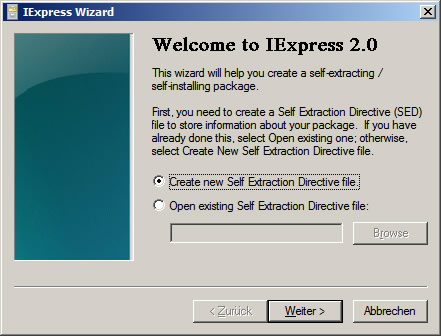
The Windows\System 32 directory contains a file called iexpress.exe. This allows you to pack multiple files into one cabinet file. By double-clicking on iexpress.exe, an assistant starts.
- Specify that a new archive should be created, “Continue”
- Set how files should be decompressed later.
for ordinary packing and unpacking: option “Extract files only”
for installation program (rather for programmers): “Extract files and run an installation command” - Enter meaningful names for the package
- Default setting for next two queries, “Continue”
Select which files to pack. Add each file (not a complete folder) with “Add” - Next two queries, set filename and destination path of the cabinet file
This file can now be copied to disk or burned to CD. When the file is needed again, copy CAB file back to disk and start decompression with double click.