
For home and office use
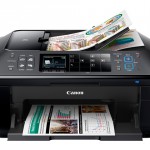
Print, scan, copy and fax with the Pixma MX715 via USB, Ethernet or WLAN. Due to the compatibility with Apple’s Air Print, printing via iOS device is also possible, recently also scanning, there is an app from Canon in the App Store. Also the Android user is not too short, for Android there is also an app.
 Duplex scanning
With the help of the Automatic Documents incl. Duplex function (short DADF) can be placed up to 35 pages in the indent and thus also scanned two-sided documents. Of course, Canon has also created the possibility to directly create a PDF file from the scanned document.
Just go fast
With a printing speed of about 12 ISO pages in black and about 9 pages in color, the printer is a real sprinter among the inkjet printers. Even a borderless photo with the dimensions of 10×15 cm is printed in 20 seconds. However, the copying takes a little longer compared to the printer a black page takes 14 seconds here. With the Quick-Start technology developed by Canon, the multifunction device is ready for use after only a few moments.
Easy to use
The 6.2-inch TFT display allows quick access to the available functions as well as a preview of images. Due to the bifunctional control panel, the LED keys were occupied twice. Depending on the operating mode, the key display changes here, thus savings were made in the number of keys.
Efficient and economic
With the 5 separate ink tanks, the PIXMA MX715 only ever has to change the empty cartridge.
Environmentally friendly and economical
The duplex process allows you to print paper on both sides and thus effectively reduce CO2 emissions.
Direct scanning
A USB interface and a memory card reader have been installed on the front of the printer, which allows you to scan documents directly on a USB stick or memory card.
by Florian Sackl.