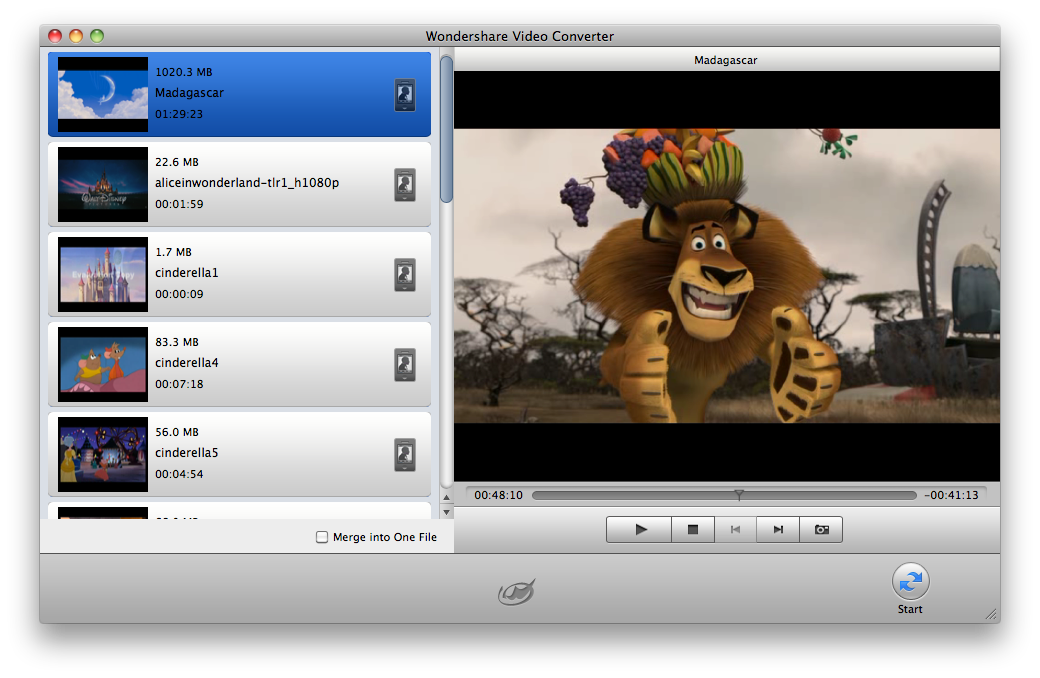
Wondershare Video Converter for Mac offers you a really simple solution for converting various video and audio formats to Mac OS. This Mac Video Converter can convert various video (HD video, camera video, web video) and audio files to import them to various mobile players, applications and website, such as the latest iPhone4, iPad, iPod, iPhone, Apple TV, PSP, iTunes, iMovie, YouTube (web), etc on Mac OS X.
The Video Converter for Mac not only converts standard videos (AVI, MP4, MPG, WMV, MOV, etc.), but also high definition videos (MTS, M2TS, TS, HD AVI, etc.) and finished video formats including MOV, FLV, MP4, etc. and other HD videos (HD MP4, HD WMV, HD MOV, etc.). In addition, the program extracts and converts audio tracks from your video files as WAV, MKA, OGG, 3GP, MP3 and M4A.
This Mac Video Converter offers powerful features to edit your video files. You can crop the video length and different places, change the video brightness, contrast and saturation, and adjust video/audio output settings.
Key features:
1. Basic functions
– Convert video to all types of mobile players
With Wondershare Video Converter for Mac, you can enjoy all your videos on iPad, iPod, iPod touch, iPhone (iPhone 3GS, iPhone 4.0, iOS 4), Apple TV, PSP, PDA/Pocket PC (including BlackBerry), Creative Zen, Archos, Epson Mediaplayer, and many other phones, etc.
Import video into common applications
This Mac Video Converter helps you convert to optimized video formats to import them into popular applications such as QuickTime, iMovie, iDVD, iTunes 9, Final Cut Pro, PPT, Adobe Premiere Pro, etc on Mac OS.
Make videos compatible with websites
Video Converter for Mac lets you load converted videos on YouTube, Google, Yahoo, MySpace, etc. for exchange with others.
HD video support
Supports camera/camcorder high definition and standard definition video format.
Check out the detailed list of supported video, audio and image formats in Tech Specs.
2. Video editing functions
– Cutting videos
With the help of the Mac Video Converter, you can cut or close popular and also unpopular movie sequences video. At the end you have short or mixed sequences.
Video Crop
Cut the video image size to get rid of the black border or anything else.
– Brightness, contrast and saturation
Video brightness, saturation and contrast can also be changed. Add artistic effects like from old movies, canvases or negatives.
– More visual output formats to choose from
This Mac Video Converter offers many output formats, ranked by device type, and allows you to change the default parameter settings to meet your specific needs.
– Preview and snapshot
The built-in player in this video converter for Mac allows you to view videos. This preview lets you take a snapshot of a video image of your choice and save it as a BMP file.
– Merge multiple video files into a single file
– Easy to use
Batch conversions, subtitle settings and drag & drop features make the program easy to handle.