After a new installation of Windows 7 and installation of Adobe®Reader XI, it has happened to us, if you open PDF documents and then print them, the printer simply stops.
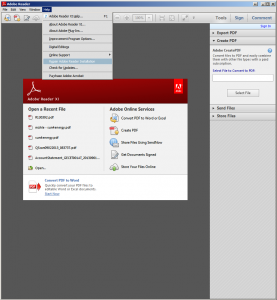
First of all, you should reinstall the printer driver e.g.: if a PCL 6 driver is installed, test an older PCL 5 or a PS (Post Script) driver, if this also did not work Adobe® has created a repair option for the reader installation, this can be started via Help –> Adobe Reader Installation Repair Here the current installation is executed again and the PC is then restarted.
In our case, printing worked again after Adobe Reader repair.