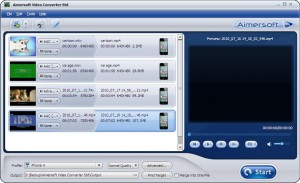
Aimersoft Video Converter Std is the best video converter to convert videos between media formats. As a functional video file converter, it is expert at converting HD videos like AVCHD and SD videos like AVI, MP4, WMV, MOV, MPEG, Xvid with perfect output quality and high speed. With this video converter you can convert videos freely for iPad, iPhone 4 (4G), iPhone 3GS, iPod Touch, iPod Nano, Google Nexus One, etc.
– Support high definition video conversion
Video Converter supports a wide range of HD video formats, allowing you to convert HD formats such as AVCHD (. M2TS,. MTS), TS, TRP, HD AVI, HD WMV, HD MOV to SD formats and even upgrade SD to HD Video.
– Convert videos between all common video formats
Video Converter supports all major video formats such as AVI, MP4, WMV, MPEG, MOV, VOB, FLV, MKV, SWF, 3GP and more. You will always find a compatible video format for your devices.
– Extract audio and capture image from video
Video Converter can extract audio from video and convert it to audio formats such as WMA, MP3, M4A, AAC, OGG, MKA, FLAC etc. You can also capture your favorite scenes from videos and save them in BMP, JPG image formats, support for a variety of multimedia devices
– Fully compatible with various multimedia devices
This Best Video Files Converter supports iPad, iPod, Zune, iPhone, Apple TV, PSP, PS3, Blackberry, Xbox 360, Archos, Sandisk, iRiver, Motorola Droid/Cliq, Google Nexus One, Creative Zen, PMP, MP4/MP3 Player, Smartphone, Pocket PC, PDA, Phone, etc.
– Optimized setting for multimedia players
Set parameters such as resolution, frame rate, encoder bitrate of video and sample rate, channel, encoder, bitrate audio for your specific needs and save it as your own profile. Or you can simply keep the default setting.
Personal Videos by Editing and Adding Effects
Crop size of video
Scale the frame size of video to get the part you want during aspect ratio of video source. You can easily remove the black bars from movies and view them in full screen mode.
– Add effects to videos
Set the brightness, contrast, saturation of the video, add special effects like Old Film, Relief, Gray and Negative, or adding text or image watermarks to personalize your videos.
Trim or split videos
Cut your favorite part from the video by checking the start time and the end time. You can also split a single video file into several ones by a certain time or split size to satisfy your needs.
Combining multiple files into one
The best video converter allows you to join multiple video files into a large one you enjoy without interruption, or create multiple segments into your own videos.
Adding Subtitles
Still have no idea how to add subtitles to your videos? The best video converter you can * add. Srt, *. Ace, *. Ssa files into various video files. Also, you can customize the subtitles of your own style.
Easy, fast and convenient to convert
– Easy to use
The intuitive interface and drag-and-drop functionality allows you to finish the conversion with just a few mouse clicks, even if you’re a beginner. This video file converter also allows you to preview the original and the edited files side-by-side for an easy comparison.
Batch conversion
The multi-threading procedure guarantees you a fast and stable conversion of several files at the same time.