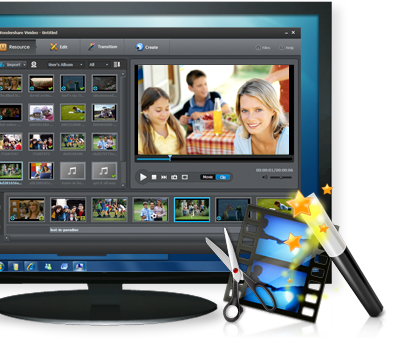
Wondershare Video Editor is a video editor for users of Windows to edit SD and HD videos, and to create movies with Hollywood quality and background music, as well as scene transitions. It is so simple that even beginners can easily change creative videos with the help of a video editing program.
With Wondershare Video Editor, you want to show off your creative streak to create enticing movies, regardless of format compatibility. You can edit video, audio and background audio regardless of the use of the three timeline tracks, and this feature mostly improves the flexibility and precision of video editing. Just copy the video and drag it into the video editor and then crop, split, merge, cut and rotate as you want. To make your creation stunning, you can expand your videos with background music, scene transition, and video special effects.
This video editor is also a video converter, so you can convert videos to any formats and save them to hard drive for further use. Or enter the output video for playback on portable devices such as iPhone, iPad, PSP, iPod, etc.
Main characteristics:
- Assisting in importing video or audio captured by DV cameras and camcorders and now generated on portable devices.
- High compatibility of data formats: for videos AVI, MOV, MP4, MPG, MKV, FLV etc, for audio AAC, APE, AIF, MP3, OGG, WMA etc.
- It is possible for you to edit video, audio and background music separately on the disc of the video editing timeline.
- Cut: Cut your video so you get the clips you want to keep.
- Split: Simply split a video into several individual video segments.
- Stick together: Remove gaps between video clips and connect multiple video clips into one.
- Cut: Cut a video image and remove black borders, logos, subtitles, or any other parts you want.
- Rotate: You can rotate an object in any direction – tilt horizontally, tilt vertically, turn right and turn left.
- Add music: You can insert your favorite music as background music. It is also possible to insert fade-in and hide functions to customize your background music.
- Insert a scene transition: There are 48 transition effects available between the video segments and the timeline, which you can also see in the preview display.
- Special video effects: You can customize brightness, contrast and saturation. By the way, you can also adjust the general parameters such as resolution, encoder and bitrate for optimal results in any way.
- Furthermore, Wondershare Video can be used to save your videos in various formats on your computer for further use.
- It is also possible to convert your videos for playback on your portable devices such as iPhone, iPad, PSP, iPod, Wii, Zune, etc to the associated formats.