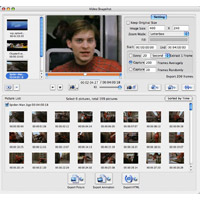
Xilisoft DVD Snapshot for Mac is multifunctional DVD image capture software to provide DVD images from DVD video and DVD folders, and enter as static images, GIF and Flash animation, and even HTML page.
It has two recording modes, such as capture DVD image in batch and take individual snapshots. You can preview captured images from the image, and then select the exact images from Frames to Output in the list.
Key features:
- Supports adding different sources to the output recorded DVD image directly, or taking pictures of each and showing them in the group on the image list for you to export;
- There are three types of batch image capture: extract images at specific intervals, grabbing halfway, and capture at random;
- You can capture snapshot of DVD or export current frame when playing the video.
- The list allows you to select DVD images of frames exactly for the photo or replacing the selected;
- You can set the start and end time of the DVD or drag the slider time to select a segment for batch capture;
- A DVD player is integrated for them to preview the DVD;
- You can preview the pictures in the picture list.
- In the image list, you can optionally output captured images from different sources, or select „All images in need of different sources for output as a single animation file or HTML page;“
- Adjust the image size of the output, select the appropriate size of the preview images and filler color to prevent the image from distortion;
- You can use images with different subtitles or none and of certain angles; It can capture DVD image with super image quality close to the original.