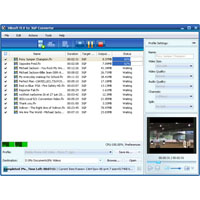
Watch movies on your mobile phone anytime, anywhere by converting movies and videos from FLV to 3GP with Xilisoft FLV to 3GP Converter. Convert to batches for faster processing – dual-core and multi-core CPU supported.
Change the default settings for the output file to get them here 3GP videos; split a large file, extract a specific video segment you prefer or set other advanced parameters.
Key features:
- Convert multiple FLV videos to 3GP, 3GP videos are compatible on the mobile phone.
- Create 3GP/ 3G2 videos of your photos: JPG, PNG, BMP and GIF image formats.
- Faster conversion speed because of dual-core and multi-core support. More cores means faster.
- Divide a large file into several files by specific parts of time and size.
- Input file properties to calculate preferred size of output file using the bitrate calculator.
- Cut a video segment by setting the start time and duration before converting to 3GP/3G2 video format.
- Setting the parameters for advanced video output: video codec, video size, bitrate, framerate, audio codec, channels.
- Supports multithreading and batch process – saving the conversion more time.
- Run converter in the background and even perform an action that is performed after the conversion is complete: Sleep, Shutdown, Standby or Quit.
- Preview source video file and create snapshot and anytime during preview.
- Automatically update software version.
- Multiple languages to choose from: English, Japanese, German, French and Chinese.