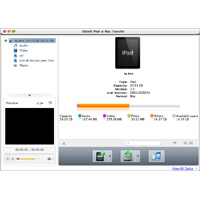
Not only for transferring files from your Mac to iPad like iTunes, Xilisoft iPad to Mac Transfer can also transfer iPad videos and music to your Mac, as well as copying files from iPad to iTunes Library.
Xilisoft iPad to Mac Transfer applies to all iPad/iPhone/iPod models: iPad Wi-Fi , iPad Wi-Fi +3G, iPad 16GB, iPad 32GB, iPad 64GB, iPhone, iPhone 3G, iPhone 3GS, iPhone 4, iPhone 5, iPhone 5s, iPhone 5 and iPod touch
Main functions:
- Transfer iPad videos and music to your Mac.
- Copy movies, music and pictures on your Mac, iPad without iTunes.
- Transfer music, movies and videos from iPad to iTunes on your Mac.
- Find your iPad files quickly and instantly.
- You can edit music file information such as name, artist, album, composer, and year.
- Easily create, edit or delete iPad playlists with this iPad to Mac transfer software.
- View iPad files in list or thumbnails. Allows you to add illustrations for iPad video and music files in thumbnails.
- Once your iPad is connected, you can view the iPad information, including model, capacity (occupied and available storage), version, serial number and format.
- Supports all iPad/iPhone/iPod models, including iPad Wi-Fi, iPad Wi-Fi +3G, iPad 16GB, iPad 32GB, iPad 64GB, and even iPhone, iPhone 3G, iPhone 3GS, iPhone 4, iPhone 4S, iPhone 5, CDMA iPhone, iPhone 5s, iPhone 5 and iPod touch, iPod touch 5, iPod nano 7.
- File transfer between iPad, iTunes and Mac is all done in a wink.
- Languages are available in English, German, French, Simplified Chinese, Traditional Chinese and Japanese.
- Support multiple iOS devices at the same time
- Read and export images and videos from the device
- Continue playing the transferred videos on the device
- Directly a preview of the device’s videos, music and other files smaller than 8 MB on the computer.