
When reading newspapers, viewing an advertisement, or surfing the Internet, I often wonder, „What typeface is this?“
The app I want to introduce to you today serves a practical purpose, and quite reliably: to recognize fonts of photos. WhatTheFont is the name of the software that accesses the extensive database of myfonts.com. There are more than 20,000 fonts ( fonts). Thus, the search in the vast majority of cases provides an acceptable result.
In three steps you do this:
1. Take photo with the camera or select from the photo archive. The font should be recorded as sharply as possible, on a white background and without distortion.
2. Select the area of the photo where the font is most visible. It is easy to correct skewed perspectives here. Important: select a „representative“ word, so not necessarily „mama“ (too few different letters).
3. The program now recognizes (ideally) the individual letters apart and asks you for the row of each individual for input. So you enter which letter combination it is, so that the app is also sure that it has recognized the word correctly.
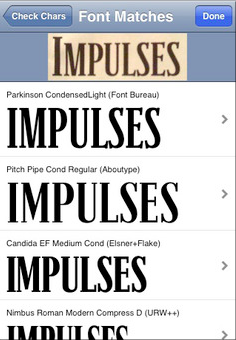
Now you come to a list of fonts that look as similar as possible to your desired font. And with a little luck, you will even find the exact same typeface.
In my experience, the service works at least so well in most cases that you can see a clear similarity between the font on the even snapped photo and the search results. All displayed fonts can then be purchased and used directly at myfonts.com.
Have fun!
Link to the app: https://itunes.apple.com/at/app/whatthefont/id304304134?mt=8
Submitted by Pee Kay