
If the Mozilla Thunderbird has a drawing problem, there are the following ways to solve the problem.
First check the fonts and character codes.
Extras –> Settings –> View tab –> to the right of the font click Advanced…

Here the settings should be set to Western.
If this is already the case, proceed as follows.
Inbox character coding option
Right-click on the Inbox folder and check the standard character encoding. Here Westlich should be set again (ISO-8859-15).
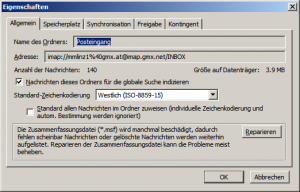
Note that this character set setting for standard character encoding must be set separately for each folder. It can happen that not only one folder is wrongly set or that only one folder is wrongly set.